
Improving Movistar Fiber: Why Bridge Mode Often Fails
Anyone in Spain (including Mallorca) with fiber from Movistar or O2 knows the standard white box (the “HGU”). Many people want to use their own, better WiFi router behind it (for example from Ubiquiti, ASUS or AVM). But the attempt often fails or runs unstably.
Here we explain in plain terms why the easy solution often does not work and how to get rid of the “white box” completely.
1. The problem with the “half solution” (Monopuesto / bridge mode)
Q: I can just switch the Movistar router to “bridge mode” (Monopuesto). Isn’t that enough? In theory yes, but in practice it often causes trouble. Movistar calls this function “Monopuesto”, but technically it is not a true bridge mode.
Why it often goes wrong:
-
It is a false promise: Even in Monopuesto mode the Movistar router stays active. It does not pass the data through 100% transparently but often still interferes with the traffic in the background (management data).
-
Double network chaos: Conflicts often occur when the internet connection is set up (PPPoE login). Your own router tries to log in, but the Movistar router blocks or confuses the request. The result: dropped connections or no internet at all.
-
Wasted power: You have two devices running (the Movistar box plus your own router), even though the Movistar box only serves as a “dumb adapter”. That takes up space and power for no reason.
-
Heat and crashes: Movistar routers are not known for their longevity. In summer on Mallorca they tend to overheat. If the “modem” crashes, even the best router of your own behind it is no help.
Bottom line: Monopuesto mode is often a shaky stopgap. The clean solution is to banish the Movistar box to the closet for good.
2. The clean solution: the SFP stick (fiber directly)
Q: How do I get rid of the Movistar router completely? By plugging the fiber cable directly into your own router. For that you need a special adapter, a so-called SFP stick (technically a “GPON ONT”). This stick is barely bigger than a lighter and replaces the entire white Movistar box.
Q: Can I buy any stick and just plug it in? No, absolutely not! The Movistar network is secured like a high-security wing. If you just plug in any stick, the network recognizes “that is not our device” and blocks access immediately.
You need a special, programmable stick that can “disguise” itself.
3. The alternative: the external ONT (the “little box”)
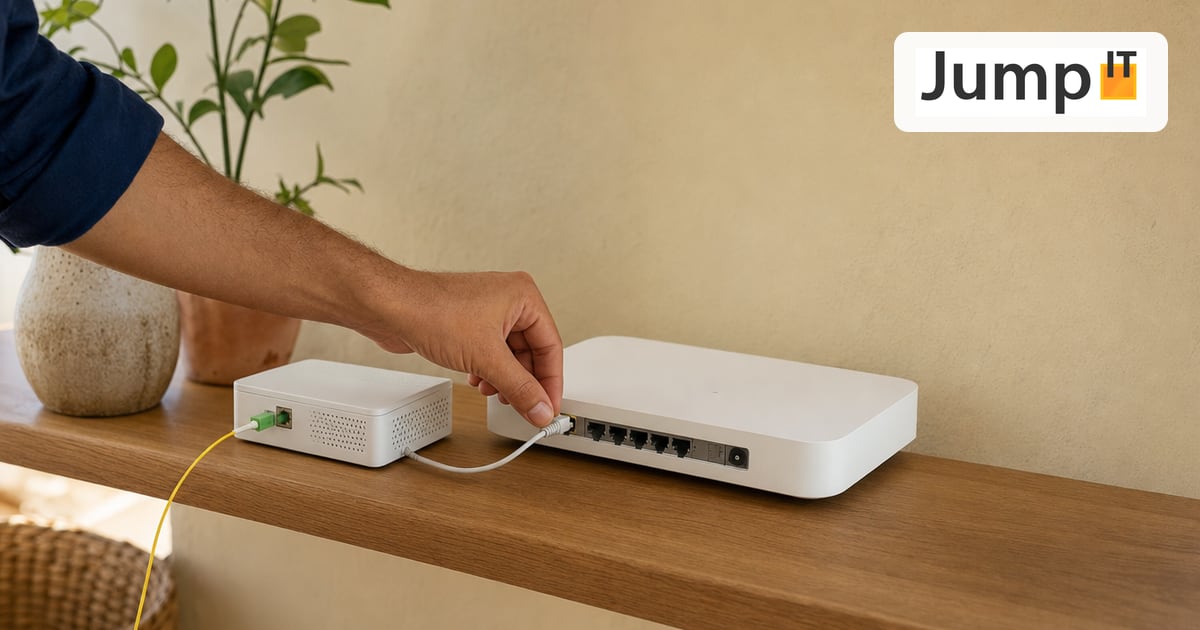
Q: My router has no SFP slot at all. Do I still have to keep the Movistar box? No. If you use a router without a fiber slot (for example a regular FRITZ!Box, a mesh system like Eero/Orbi or an ASUS gaming router), an external ONT is the solution.
Q: What is an external ONT? Think of it as a “mini modem”. It is a small box (about the size of a cigarette pack) with just one job: converting the light signal from the fiber into an electrical network signal (RJ45).
- The path: Fiber into the wall socket -> fiber into the small ONT -> network cable -> your own router.
Q: What are the advantages over the stick? Although it is an extra device, many experts swear by it:
-
No heat problems: SFP sticks get very hot in operation. In poorly ventilated routers this can lead to crashes. An external ONT sits out in the open and stays cool.
-
Free choice of router: You can use any WiFi router on the market, even ones without a professional hardware slot.
-
Troubleshooting: The LEDs on the ONT show you right away whether the fiber line is up, without having to log into the router.
Q: Which device do I buy? Again: do not just buy anything! There are two common ways:
-
The “retro” way: You get hold of an old original Movistar ONT second-hand (for example via Wallapop or eBay), such as the Huawei HG8240H, as was common before the HGU era. Since it is original hardware, it runs very stably, but you have to make sure you can enter the access data (IdONT) on it.
-
The “pro” way: You buy a freely configurable ONT, such as the Ubiquiti UFiber Loco. It is very popular because (similar to the SFP stick) a simple menu lets you change the serial number and password to make the “disguise” perfect.
4. The “disguise”: what you need to know
Q: How does this “disguise” work? Your new stick has to make the Movistar network believe it is the old white box. To do that, we have to copy two things from the old box to the new stick:
-
The “ID card” (serial number/SN): Every router has a serial number that is unique worldwide. We have to program it into the stick.
-
The “secret word” (PLOAM password / IdONT): This is the actual key. Without this password, the exchange lets no data through.
Q: Where do I find this secret word? This is the only hurdle. The password is not on the sticker under the device. You have to log into the menu of the old Movistar router and read it from a hidden spot. Whoever manages that has done the hardest part.
5. Setting up your own router
Q: Once the stick is programmed, what do I need to set on my router? Your own router has to know on which “frequency” (VLAN) the internet arrives. In Spain the following standard values apply for Movistar:
-
VLAN ID: 6
-
Priority: 1 (Very important! If you forget the priority, the download is often fast but the upload is extremely slow).
-
Login credentials: The user credentials are the same for everyone at Movistar (
adslppp@telefonicanetpa/adslppp). The real security runs only through hardware recognition (see point 3).
Q: Will my landline phone still work then? Yes and no. If you remove the Movistar box, the phone sockets on it will of course no longer work.
-
For pros: You can set up telephony (VoIP) in your own router, but that is very complicated (other VLANs).
-
For most people: If you hardly use a landline, you do without it or use simple VoIP services like Skype/WhatsApp.
Fiber from a pro: router, splicing and WiFi on your property: Fiber on Mallorca
See also: Fiber technology in Spain: Movistar, Orange, Vodafone and regional providers compared.
More articles
 Internet Security Password Manager: Why You Need One and Why We Recommend 1Password
Why a password manager is a must even for ordinary users, how it works, and how 1Password differs from the built-in options in macOS, Windows and Google Chrome.
 Internet Security Starlink on Mallorca: Finally Fast Internet, Even at the Finca
Starlink works surprisingly well on Mallorca: fast, stable and instantly available for fincas without fiber. What to know about CGNAT and VPN.
 Internet Security Geoblocking: why you cannot see some content online
From YouTube blocks to pricier hotel rates: geoblocking depends on your IP address. Read how it works and how you can get around it.
 Internet Security How Does IPv6 Actually Work?
IPv6 uses structured addresses, automatic configuration and direct connections without NAT. Why Dual Stack makes the switch seamless.
Note: images and parts of the text on this page were created with the help of artificial intelligence and editorially reviewed by JumpIT.
← To the knowledge center