
Fiber Types: OM1 to OM5, OS1/OS2, G.652.D and G.657
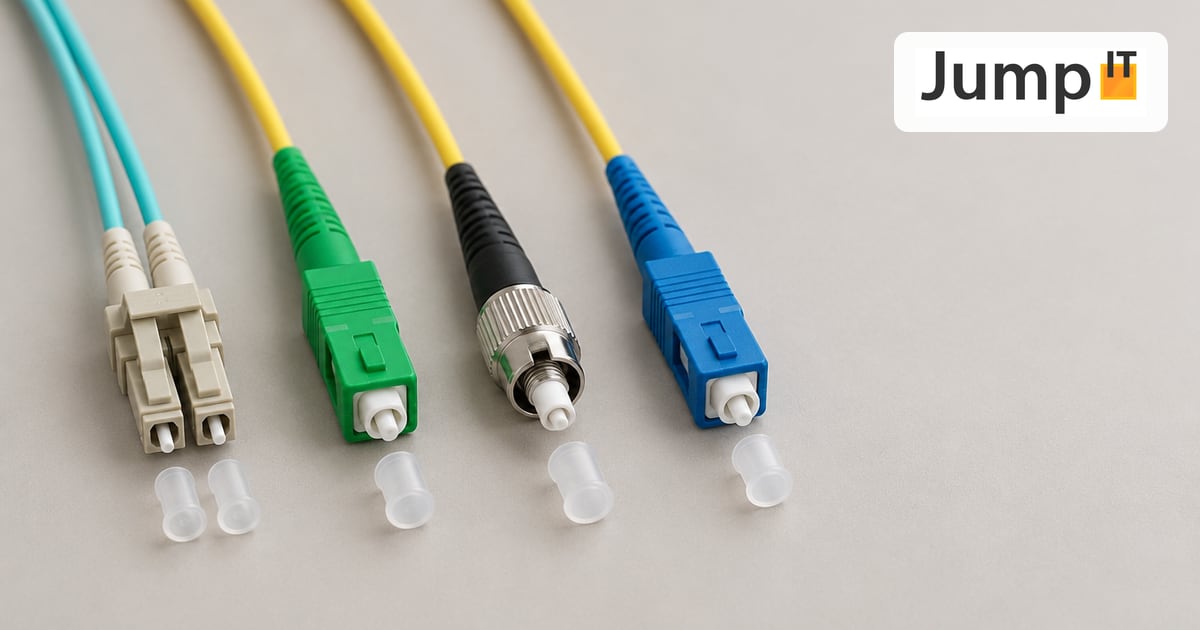
Which fiber for what, what the abbreviations mean and which connector goes where.
In short: There are two families. Multimode (OM1 to OM5) has a thick core, is inexpensive in terms of equipment and is enough for short runs within a building or server room. Singlemode (OS1/OS2) has a tiny core and covers many kilometers. It’s the fiber used by network operators and by every fiber house connection. The ITU designations G.652.D and G.657 describe exactly which singlemode fiber is inside the cable.
1. The difference is in the core
Every optical fiber has a light-carrying core and a glass cladding that keeps the light in the core. The cladding is always 125 µm thick. The core makes the difference:
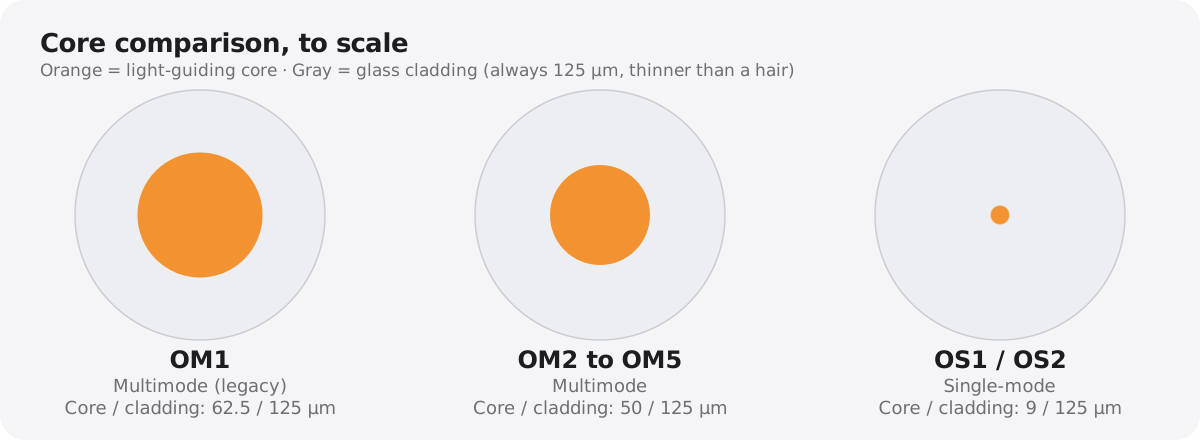
- Multimode (50 or 62.5 µm): In the thick core, many light paths (“modes”) run at the same time, some straight, some zigzagging. They arrive slightly out of sync and the signal smears. That’s why it’s over after a few hundred meters.
- Singlemode (9 µm): The core is so thin that only a single light path fits. Nothing smears, and the signal arrives cleanly over 10, 40 or 80 km.
Multimode technology uses inexpensive light sources (LED, VCSEL at 850 nm), while singlemode needs more precise lasers (1310/1550 nm). That used to be a big price difference; today it hardly is anymore.
2. Multimode: OM1 to OM5
The classes OM1 to OM5 come from the ISO/IEC 11801 standard. The higher the number, the more bandwidth and range.
| Class | Core | Jacket color | 10 Gbit/s | 40/100 Gbit/s | Use |
|---|---|---|---|---|---|
| OM1 | 62.5 µm | Orange | approx. 33 m | – | Legacy, don’t install new |
| OM2 | 50 µm | Orange | approx. 82 m | – | Legacy |
| OM3 | 50 µm | Turquoise (aqua) | approx. 300 m | approx. 100 m | Server room, building backbone |
| OM4 | 50 µm | Turquoise or Erika violet | approx. 400 m | approx. 150 m | Data center, standard for new builds |
| OM5 | 50 µm | Lime green | approx. 400 m | approx. 150 m (SWDM) | Data centers with multiple wavelengths |
Important: OM1 (62.5 µm) and OM2 to OM5 (50 µm) must not be mixed. The cores don’t match, and a large part of the light is lost at the junction.
OM5 is not a “better OM4” for every purpose. It’s intended for technology that sends several light colors (850 to 950 nm) over one fiber at the same time. If you don’t use that, you’re just as well served with OM4.
3. Singlemode: OS1 and OS2
Singlemode cables are usually yellow. The classes OS1 and OS2 don’t describe the fiber itself but the cable and its attenuation:
- OS1 (now OS1a): for indoor cables with tight-buffered fibers, attenuation up to 1.0 dB per km. Intended for buildings and short runs.
- OS2: for outdoor cables with loose tubes, attenuation up to 0.4 dB per km. Covers many kilometers and is the standard for buried cables and between buildings.
In both cases the same fiber is usually inside, namely G.652.D. The difference is in the cable construction.
4. G.652.D, G.657 and G.656: the ITU designations
If you read datasheets, you’ll often find an ITU number instead of OS1/OS2. The three most important:
G.652.D – the standard singlemode fiber. By far the most common fiber in the world. The “D” stands for “Low Water Peak”: during manufacturing, almost all the water is removed from the glass. This makes the entire range from 1260 to 1625 nm usable, including CWDM with many wavelengths.
G.657.A1 and A2 – bend-insensitive. A further development of G.652.D that tolerates tight bends without losing light:
- G.657.A1: bend radius down to 10 mm
- G.657.A2: bend radius down to 7.5 mm
- (G.657.B3: down to 5 mm, for very tight routing in apartments)
The A variants are fully compatible with G.652.D and can be spliced together without any problem. The thin drop cable that runs from the CTO on the pole to your house almost always contains G.657.A2. That’s the only reason it can be routed around house corners and through conduits.
G.656 – don’t confuse it. The number sounds similar but means something completely different: a fiber for long-haul links with many wavelengths (DWDM) between cities or countries. It doesn’t occur in the house, on the property or in the FTTH network. If you mean “A1/A2”, you mean G.657.
5. The connector types
Besides the fiber, the connector decides what fits together. The six most common at a glance:
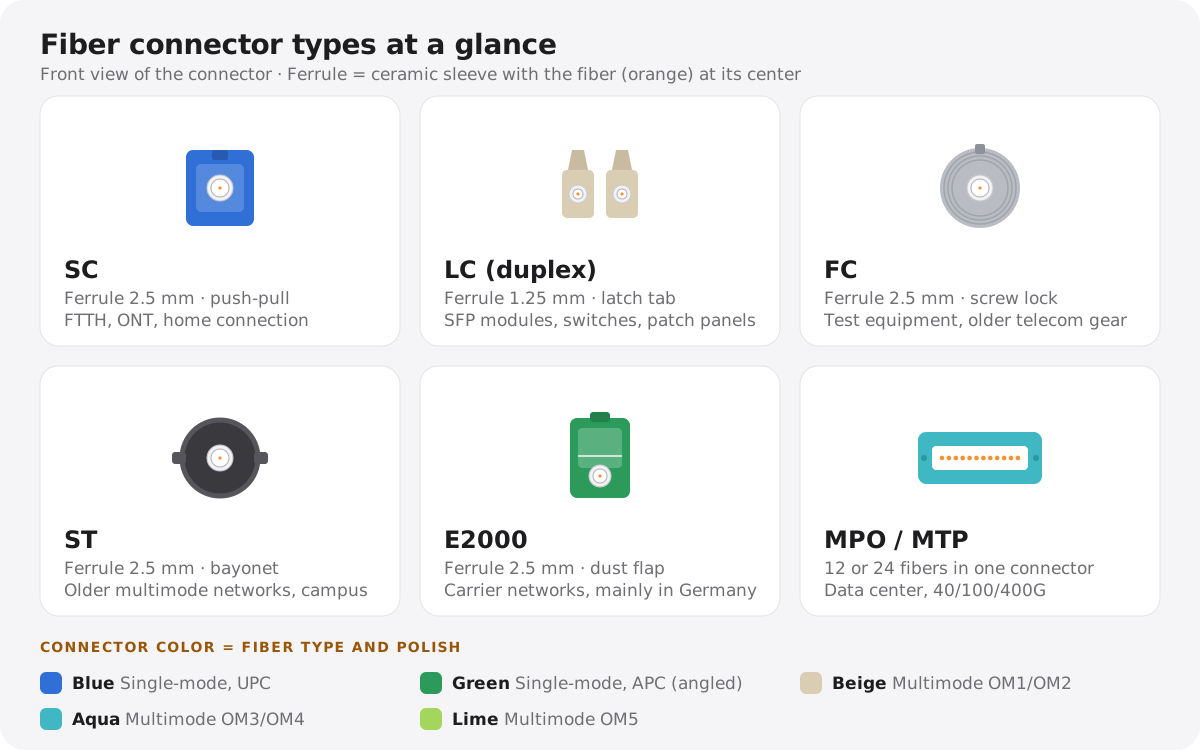
Tip: tap the graphic to open it at full size.
Here’s what the six connectors look like in real life:
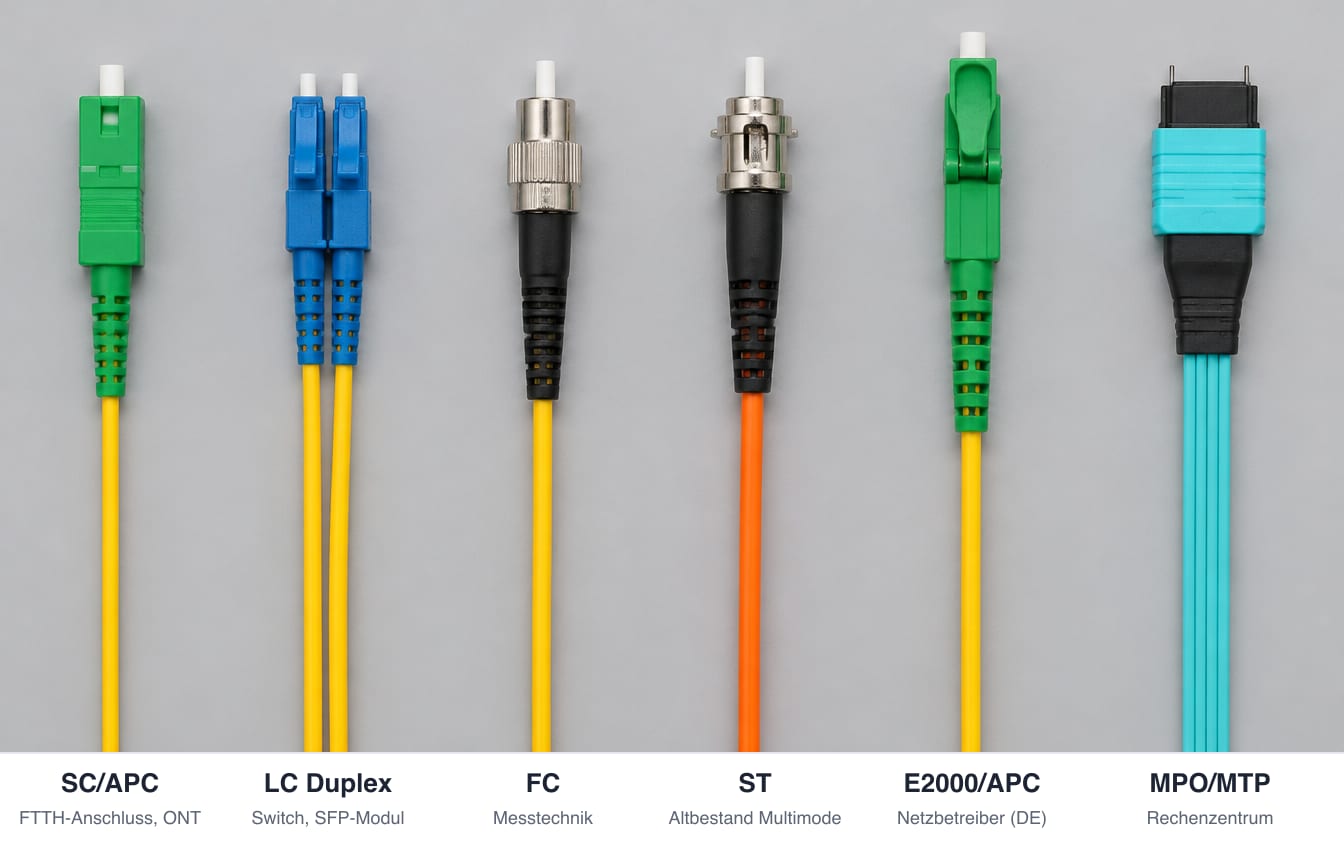
What you’ll see in practice:
- SC (usually green): at the fiber connection, at the PTRO outlet and at the router or ONT. Green means angled polish (APC).
- LC (small, often as a duplex pair): on switches, SFP modules and patch panels. On UniFi switches with an SFP port, this is the norm.
- E2000: common in Germany with many network operators, rare on Mallorca.
- MPO/MTP: only in the data center.
The most important rule: Never connect green (APC) and blue (UPC) connectors. They fit together mechanically, but the end faces are polished differently. You’ll find more on colors and fiber order in the article Fiber Optic Color Codes: Fiber Order Explained Simply.
6. What do I use for what?
| Situation | Recommendation |
|---|---|
| Fiber house connection (Movistar & Co.) | Singlemode G.657.A2, SC/APC. Provided by the carrier. |
| Link between main house and guest house, pool equipment, outbuildings | Singlemode OS2 (G.652.D or G.657.A1), outdoor cable. Even at 50 m. |
| Within a room, switch to switch | Singlemode or OM4 with LC, depending on the SFP module |
| Server room, data center | OM4 or singlemode, MPO for high density |
| Existing OM1/OM2 line | Keep using it as long as 1 Gbit/s is enough. For 10 Gbit/s, install new. |
Our recommendation for fincas and properties: always singlemode. The price difference for cable and SFP modules is minimal today, singlemode handles any distance on the property and is ready for 10, 25 or 100 Gbit/s in the future too. Multimode only still saves money in the data center.
Frequently asked questions
Can I connect multimode and singlemode fibers? Not directly. Light from the thick multimode fiber doesn’t fit into the 9 µm core. For that you need a media converter or a switch with matching SFP modules on both sides.
How can I tell which fiber is installed at my place? From the jacket print: it shows the fiber count, type (e.g., “9/125 G.657.A2” or “50/125 OM4”) and manufacturer. The jacket color is a good hint but not proof. With outdoor cables in particular, the jacket is always black.
Do I need OM5 or OS2 at home? In the house and on the property: OS2, i.e., singlemode. OM5 only pays off in data centers with special multi-wavelength technology.
Is G.657 worse than G.652.D? No. G.657.A1/A2 meets all the values of G.652.D and additionally tolerates tight bends. For house connections and indoor routing it’s the better choice.
What JumpIT does for you
We plan and lay fiber on your property: between the main house, guest house, workshop and pool equipment, with suitable outdoor cables, clean splices and documented assignments. We also supply switches and SFP modules that match the installed fiber.
Fiber from the pros: Router, splicing and WiFi on your property: Fiber on Mallorca
See also: GPON and XGS-PON: What’s Behind Your Fiber Connection?
Contact: jumpit.eu · JumpIT Netzwerk Service, Llucmajor
More articles
 Networks Retrofitting Network Cable: Is It Worth It?
Pros and cons of retrofitting network cable, the realistic effort, and how we find existing conduits with the Kati® Blitz Ortung 2.0 without opening the wall.
 Networks Fiber Optic Color Codes: Fiber Order Explained Simply
Red, green, blue or blue, orange, green? DIN/IEC 60304 vs. TIA-598 color codes, counting from fiber 13, loose tubes and connector colors, with tips for splicing and patching.
 Networks GPON and XGS-PON: What’s Behind Your Fiber Connection?
GPON or XGS-PON? How both fiber technologies work, what 1 and 10 Gbit/s really bring, which providers in Spain use what and where things stand on Mallorca.
 Networks Ethernet Cables and Their Abbreviations
What UTP, F/UTP, F/FTP, S/FTP and SF/FTP mean on Ethernet cables: the different types of shielding and cable categories, explained in plain language.
Note: images and parts of the text on this page were created with the help of artificial intelligence and editorially reviewed by JumpIT.
← To the knowledge center